

The Kerala Employment Exchange Seniority List 2026 has been published district-wise on the official portal. If your name appears on this list, you may be considered for government job placements through your registered Employment Exchange. In this guide, you will learn how to check the list online, download the PDF, understand the difference between the provisional and final list, and what to do if there is an error.
Last Updated: May 2026 | Official Portal: eemployment.kerala.gov.in
What Is the Employment Exchange Seniority List?
The Employment Exchange Seniority List is an official document published by the Kerala Employment Exchange under the Department of Employment and Training. It ranks registered job seekers by seniority — based on how long they have been registered and their qualifications.
Government departments and public sector institutions in Kerala use this seniority list to fill vacancies for certain posts. If your name appears at a higher rank and a relevant vacancy opens up in your district, you may receive a direct call from the Employment Exchange.
The list is prepared district-wise across all 14 districts of Kerala and is available in both English and Malayalam.
Kerala Employment Exchange Seniority List 2026 – Key Details
| Details | Information |
|---|---|
| Published By | Department of Employment & Training, Kerala |
| List Type | District-wise Seniority List |
| Year | 2026 |
| Availability | Online (English & Malayalam) |
| Official Website | eemployment.kerala.gov.in |
| List Types Available | Provisional List, Final List |
| Districts Covered | All 14 Districts of Kerala |
How to Check Employment Exchange Seniority List 2026 Online (Step-by-Step)
Follow these steps to check your name in the Kerala Employment Exchange Seniority List:
Step 1: Go to the official website: https://www.eemployment.kerala.gov.in/pub/publicSeniorityList/seniority_list
🎓Jobs with Similar Qualification
KSRTC Swift Recruitment 2026: 1,040 Driver & Conductor Vacancies – Apply Online📅 Last Date: October 22, 2026RRB NTPC Graduate Notification 2026 Out – 3548 Vacancies, Apply Online📅 Last Date: November 6, 2026Sahitya Akademi Recruitment 2026: Apply for 30 Various Posts – Eligibility, Salary, Selection Process & Application Form📅 Last Date: October 21, 2026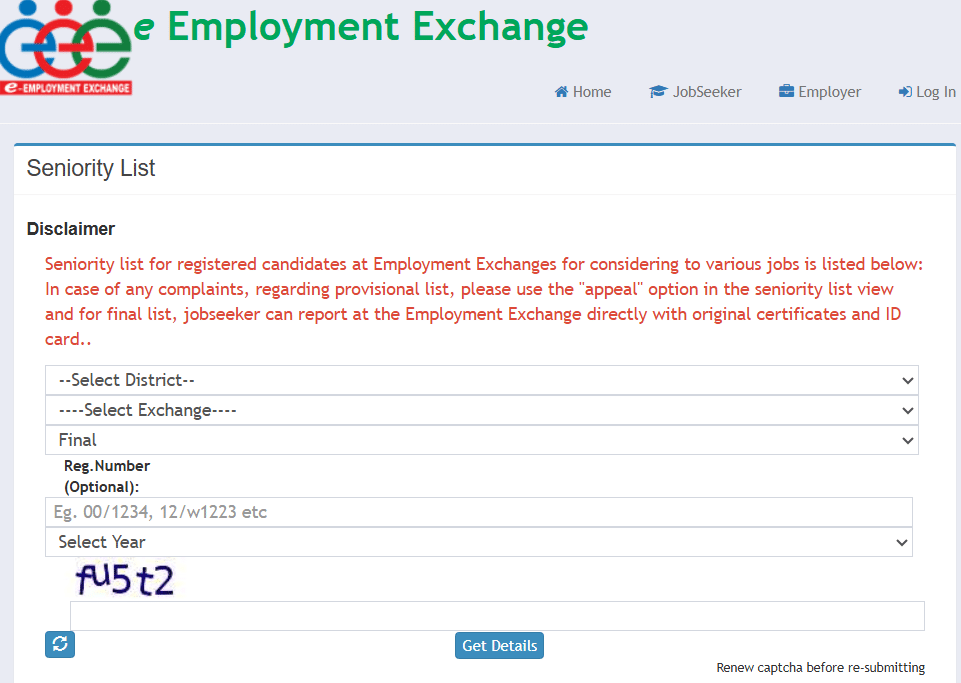
Step 2: You will see a search form on the screen. Select your District from the dropdown menu.
Step 3: Select your Employment Exchange (the specific exchange where you registered).
Step 4: Select the List Type — choose either “Provisional” or “Final” based on which list you want to check.
Step 5: Select the Year (2026).
Step 6: Enter the Captcha shown on the screen.
Step 7: Click the “Get Details” button. Your district’s seniority list will appear on the screen.
Step 8: Use Ctrl+F (Find) to search for your name or registration number in the list.
Employment Exchange Seniority List – All 14 Districts of Kerala
The seniority list is available for all 14 districts. Check your district from the list below on the official portal:
| District | Link |
|---|---|
| Thiruvananthapuram | Thiruvananthapuram |
| Kollam | Kollam |
| Pathanamthitta | Pathanamthitta |
| Alappuzha | Alappuzha |
| Kottayam | Kottayam |
| Idukki | Painavu |
| Ernakulam | Kochi |
| Thrissur | Thrissur |
| Palakkad | Palakkad |
| Malappuram | Malappuram |
| Kozhikode | Kozhikode |
| Wayanad | Kalpetta |
| Kannur | Kannur |
| Kasaragod | Kasaragod |
Note: Each district has multiple Employment Exchanges. Select the exact exchange where you originally registered when searching the list.
🔗 Official Link to Check:
Employment Exchange Seniority List Kerala – Click Here

How to Download Employment Exchange Seniority List PDF
You can download the Kerala Employment Exchange Seniority List as a PDF directly from the official portal. Here is how:
- Follow Steps 1 to 7 above to load your district’s seniority list.
- Once the list appears on the screen, right-click anywhere on the page.
- Select “Print” and choose “Save as PDF” as the printer destination.
- Click Save. The seniority list will be saved to your device as a PDF.
Alternatively, some district lists are available as direct PDF downloads. After clicking “Get Details,” look for a download button or PDF link on the results page.
Provisional List vs Final List – What Is the Difference?
Many candidates are confused about which list to check. Here is a clear explanation:
| Item | Provisional List | Final List |
|---|---|---|
| What it is | A draft list published for public feedback | The confirmed, official list after resolving appeals |
| Can you raise a complaint? | Yes – through the online “Appeal” option | No – appeals closed; visit the office directly |
| How to dispute an error | Use the Appeal option on the official portal | Visit your Employment Exchange with original certificates |
| Validity | Temporary until finalized | Permanent (until next revision) |
If you find an error in the Provisional List, act immediately. File your appeal online before the appeal deadline. Once the Final List is published, you cannot appeal online — you must visit the Employment Exchange office with your original documents and ID card.
How to File an Appeal for Seniority List Errors
If your name is missing, your seniority rank is wrong, or your qualification is incorrectly listed in the Provisional Seniority List, follow these steps:
- Visit eemployment.kerala.gov.in.
- Look for the “Appeal” option on the seniority list page.
- Log in with your Employment Exchange registration credentials.
- Enter the details of the error and upload supporting documents (mark sheets, certificates, ID proof).
- Submit the appeal before the deadline.
You will receive a confirmation after submission. The Employment Exchange will review your case and update the Final List accordingly.
Employment Exchange Registration Renewal – Important
Your name will automatically be removed from the seniority list if your Employment Exchange registration has lapsed. Registration must be renewed periodically to keep your name active.
Here is how to renew your registration:
- Visit eemployment.kerala.gov.in and log in.
- Go to the “Renewal” section in your account dashboard.
- Update your personal details and qualification information.
- Submit the renewal application.
Renewal can also be done by visiting your nearest Employment Exchange office. Carry your original certificates, previous job card, and a recent passport-size photo.
Important: After renewal, your seniority rank continues from where it was — your registration years are not reset.
Check Employment Exchange Seniority List Kerala – Click Here
Frequently Asked Questions
What is the Employment Exchange Seniority List Kerala?
It is a district-wise list of registered candidates ranked by seniority, used for considering government job opportunities.
How can I check the Employment Exchange Seniority List 2026 in Kerala?
Visit the official website, select district, exchange, type (provisional/final), year, and captcha, then click Get Details.
Where can I download the Employment Exchange Seniority List Kerala PDF?
You can download it directly from the official portal: https://www.eemployment.kerala.gov.in/pub/publicSeniorityList/seniority_list
Is the seniority list available in Malayalam?
Yes, the list is available in both English and Malayalam.
What should I do if I find my name in the list?
If your name is in the provisional list, you can file an appeal if there’s an error. If in the final list, visit your Employment Exchange with original certificates and ID card.

